
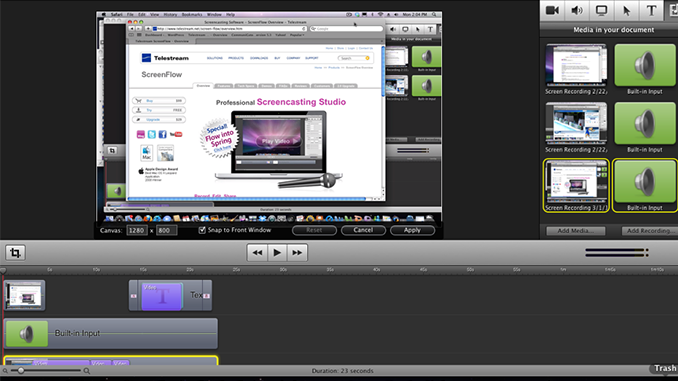
There is some debate among screencasters about what’s better: full-screen capture or partial-screen capture. Full-screen capture is just that: your entire screen gets recorded, then you crop and edit in post-production. Partial-screen capture requires that you size and position a “viewport” or recording window prior to recording, and only things in that window get recorded. I have seen this topic come up in our forums, and also as a feature request, so I thought I’d take a moment to explore some of the reasons ScreenFlow is the way it is.

ScreenFlow, by design, captures the entire screen during recording. You can then crop to your desired screen size or window size afterward. But capturing the full screen is a very deliberate product feature in ScreenFlow, and there are a couple of reasons for that:
1) Full-screen capture enables certain other capabilities: The very nature of ScreenFlow is that it is built around Mac OS technology. ScreenFlow captures the entire screen which allows it to take advantage of certain features specific to the way the Macs handle graphics – features that otherwise wouldn’t be possible if it only captured partial screen. ScreenFlow’s ability to highlight a foreground window is one example of a feature enabled by full-screen capture. Using a different technology would mean losing some major features in ScreenFlow.
2) Full-screen capture requires less pre-planning: With full-screen capture, you’ll often end up spending less time planning your screencasts prior to recording, and more time doing edits during post-production. But, in my opinion, it’s a lot easier to spend time zooming and cropping in post-production, than it is to re-record whole segments upon realizing a particularly important item on screen did not get recorded!
3) Full-screen capture gives you a versatile “master” recording. Recording the full screen gives you breathing room to change your mind after you’ve recorded, or use the entire video at a different size later, without having to re-record. For example, say you create a video specifically for a 320 x 240 output. Using a partial screen recorder, you’d set your window at that size, then record, then you’d have your specifically-sized video all ready to go after recording. But what if you later decide to use that video as part of a different HD project? You’ll have to re-record your video at a bigger size, or risk inserting a very low quality/low resolution video into your project. If you had captured it full screen, you would have the flexibility to crop it and create a 320×240 video, and then use that same recording at a different size in a different project, saving a lot of time and hassle. In other words it’s creating a high resolution “master” capture that you can then export to other sizes and codecs as needed.
The arguments I’ve seen against full-screen capture mainly revolve around file size. If you’re capturing the full screen, rather than just the portion or size you need, opponents say you’re creating bigger-than-needed files wasting valuable hard drive space. In our case, ScreenFlow uses a “proprietary” very efficient compression method that enables smaller file sizes. Also, by playing with data rates, and frame rates (and even codecs) you can achieve very small file sizes with very acceptable quality. (See “Make your video files smaller” and “Apple H.264 vs x264 – better exports” for ideas and tips.)
Some may say they prefer partial-screen capture because that’s what they’re used to using. OK, have fun with that, while the rest of us enjoy the freedom of full-screen capture 🙂
I appreciate having full-screen captures. Disk space is cheaper than frustration.
Much of my recording is done with a virtual machine where I am capturing just the center of the real screen (I have the VM set to be smaller than the real screen). All I ever need when I am doing this is the smaller virtual screen – the rest is just black.
With the change to ScreenFlow to snap to the middle when you set the canvas size, this is really a non-issue for me. Either before or after I record I still need to select a size. Might be nice to have preset sizes available in the canvas size screen, but not a big deal to have to type in a couple numbers (as long as I remember them!)
In other words: I am one of the people who the full screen recording does not, generally, benefit – but it does no harm and I certainly do not mind it.
Interesting, Michael. And I agree with you that it would be nice to have preset canvas screen sizes availabel.
Thanks for your input.
I have a similar situation to Michael’s, and would LOVE the ability to only capture my virtual machine, with a preset canvas size.
This would greatly speed editing, as I wouldn’t have to crop out my Mac’s desktop for each and every clip that I record.
And this is a related issue: scaling a cropped clip in the Video Properties panel always distorts the image, since ScreenFlow bases the scaling on the initial capture dimension, and not on the cropped dimensions. Very frustrating.
Thanks for taking feedback. I love SF (especially since I used to use Camtasia for Windows, blech)!
There’s been countless times where I would have been up a creek (to put it nicely) if ScreenFlow didn’t capture the whole screen. Some of the old screen capture programs did that — it was beyond painful.
And yes, storage is cheap – I think they give away free 500GB SATA hard drives in cereal boxes now.
Chris,
Oh was that what I got in my cheerios the other day? 🙂
I use Camtasia on the PC for years. Capturing only that part of the screen I wanted was a great feature. It should be an option.
I walk both sides of the line on this one. There are many times I wish I could capture just a window or an area, a perfect example is when I’m using a VM in a window to do screencasts.
However I do agree with a lot of the points for full screen capture, but it would be nice to have the option. I do disagree that it speeds content creation as I have to check my desktop, dock icons, etc. before capturing the whole screen incase I have something I don’t want people to see or I feel will distract the viewer.
When it comes down to it I can live with full screen capture as I am now used to it, but it would be top of my request list along with being able to draw a highlight area rather than just the foreground window highlighter we have at present.
Either way, ScreenFlow is still my favorite capture tool and am thankful to the developers for all the hard work.
My primary ScreenFlow machine has a 30″ monitor (2560×1600) so I tried a little experiment as follows: I set the Display size to 800×600 where the Color Picker in Apple Mail took nearly half of all visible screen real estate, did a test capture and then switched back to 2560×1600.
So, using the 800×600 resolution, the Color Picker window dominated the screen. However, I was unable to find a way to get this capture to scale higher than 100% and still be fully visible.
I then repeated my test capturing at 2560×1600 adding the clip to the first project. No difference because, apparently, the canvass had gotten set to 800×600 and could not be changed to higher values.
Finally, I did another capture at 2560 but saved that to a new document. In this case, I could zoom into the area of the color picker to 400%. So, the full screen capture worked better. I had more options to work with.
I used to just record a part of the screen before switching to ScreenFlow. I can’t tell you how many times I would wish I could go back and capture another part of the screen. I say FULL SCREEN ALL the WAY! I love the post editing feature that allows me to decide screen size and magnification.
I also have and use Snapz Pro with Movie option but hardly ever use the movie option anymore. The one exception is capturing streaming video that is already heavily taxing my system (Flash, Silverlight and high action DVDs). Capturing the entire screen in these cases can sometimes result in dropped frames, artifacting, etc.
When I try to crop in screen flow and hit APPLY I can still see the cropped portion through a gray screen. How do I get rid of this?