
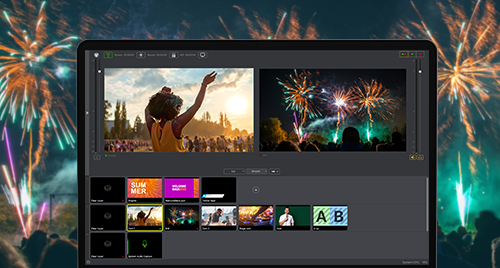

Wirecast 14.2 is here and it has some new features and improvements that make it our most user-friendly version yet. With new templates and placeholders to save time setting up documents, a new high-quality option for sending program out to other devices, and Apple Universal Support, Wirecast is more user-friendly and powerful than ever!
AND, if you purchased anytime after 4/28/2020, OR are an active Wirecast Insider Access plan member – this update is FREE!
Here’s a quicklist of what’s new in Wirecast 14.2, see below for details:
- Apple Universal Support
- Shot Templates
- Placeholders
- Secondary Display Output
- Lock Shot Icon
- Shot ISO Indicator
- Sony X-series PTZ Control
- LinkedIn Live Auto Captions
- Blackmagic Input Selector
- Audio in Webpage source
***
Apple Universal Support

Wirecast is now optimized to run natively on Apple Silicon
Shot Templates
Shot templates can be a huge time saver! Use Shot Templates to easily add a pre-configured shot layout to your document. Use our default Shot templates, or create your own customized Shot Templates!
Placeholders
We’re really excited about placeholders! Assign cameras or sources to Placeholders to quickly add a source to any number of shots. You add a placeholder to your document, then you ASSIGN a source to that placeholder, and your source will appear in place of that Placeholder everywhere in your document. This is especially helpful when using Rendezvous. You can pre-configure your document with Placeholders, and as soon as you connect to your Rendezvous guest, you can simply assign them to a Placeholder and they’ll appear in all your assigned shots.
Secondary Display Output (Pro)
The Secondary Display Live Output is a Wirecast Pro feature that lets you send the live program feed to another monitor or display. Unlike Multi-viewer, which is meant for monitoring your feeds or your live/preview screens, Secondary Display Live Output is frame accurate program out, without the need for special hardware.
You should use this option if you need a frame-accurate live output, for example to feed into an external encoder or recorder.
AND, another great benefit of this feature is, with a UVC capture device, you can use it as an alternative to Virtual Camera. This is great if your chosen platform (like Zoom or Teams) blocks Virtual Camera.
Lock Shot Icon
This is handy if you have a PTZ camera with several shots for preset camera angles. Typically, if you have live thumbnail icons on, then all the shots will show the current live view of the PTZ camera, so it’s hard to know what shot corresponds to what preset camera angle. So with this feature, you can take a snapshot of your camera angle and lock that as your shot icon, making it easier to see at a glance which shot has which preset assigned to it.
Shot ISO Indicator

You’ll now see a tally indicator on the top right corner of shots that are currently being ISO recorded.
Sony X-Series PTZ Control

A new Sony X-Series VISCA/UDP protocol profile is now available in the PTZ controller. This lets you pan, zoom and tilt your Sony X-Series camera with the built-in PTZ controller in Wirecast.
LinkedIn Live Auto Captions

Now you can easily make your LinkedIn Live broadcasts more accessible by adding auto-generated captions to any LinkedIn Live video. Click to “Enable” Auto-Captions in the Wirecast Output Settings for LinkedIn, and your viewers will see be able to see the captions in their player.
Blackmagic Device Input Selector

This new option lets you select the type of video/audio input connection (HDMI/SDI) used for incoming Blackmagic Designs sources . This helps ensure you have the right connection chosen, to reduce errors in your incoming sources. This option will be hidden when the device only supports one option. You are also given the option to choose the “default” connection which will rely on the one chosen in the Blackmagic control panel.
Audio in Web Page source
Added the ability to adjust audio from a Web Page source as well as stream it out as part of your broadcast.
And much much more!!!
For a full list of our features, improvements and bug fixes for Wirecast 14.2, head over to our Version History page.
Here’s information on how to update or upgrade.
And remember: If you are a Wirecast Insider Access member (which is included for one year when you purchase a license), then you get this upgrade for FREE!
If you want to renew your Insider or Premium Access membership, visit our Support pages.