
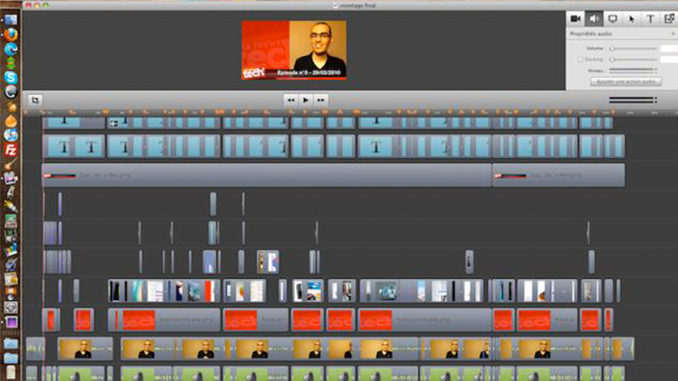

We are lucky to have a community of ScreenFlow users who love our product and like to share their tips and expertise. We count French podcaster and screencaster Matthieu Blanco as one of our most loyal and valued ScreenFlow friends- and he’s got some mad ScreenFlow skills that we can all learn from!
Matthieu is the community manager at Netvibes.com, he also produces a popular French podcast called “La Revue Tech” (“Tech Review“) (which gets more than 40,000 views per episode), and he blogs about podcasting and screencasting.
Matthieu creates very complex and professional videos using ScreenFlow and a just a few other tools. You can see by one of his recent projects how complex his edits can be in ScreenFlow.

Check out the in-depth tutorial he created about how he constructed a recent promotional trailer for a company called Arengi. The video is 31 minutes long, but I learned some fantastic techniques and tricks. I think you will too.
Merci Matthieu! You can connect with Matthieu on facebook or twitter.
Thanks so much for posting this! In fact, we do similar work to what Matthieu did for Arengi. Our clients all assume, we create our videos in Final Cut Studio and After Effects, when in fact, we do almost all of the work in Screenflow (for this kind of work, 95% of Final Cut functionality at 10% of the price) and Keynote (the unsung Mac hero for quick animations). What Matthieu only hints on is all the prep work that goes into getting to the point where his work starts. Depending on the complexity of the video, we often calculate 10+ hours per every minute of video and Matthieu is just showing you the last 90 minutes of any 10 hour segment.
Still, Screenflow is awesome for this kind of work. Also, as my editing skills grew over time, it grew right along with me as my video editor of choice. I’m still surprised how little we have to use Final Cut and how much we keep doing in Screenflow.
Veit
You’re right! 🙂
This 2 minutes video takes 20h of work.
If there was ever a reason for the programmers to add variable track height to ScreenFlow, they should do it to save Matthieu’s eyes 😀
This is a great example of what can be done with ScreenFlow, Keynote, and a little imagination. Now I realize the “average” screencaster may not always need this type of production. Lets face it, Veit is correct that this takes A LOT of time per finished minute of output. But including just a few of Matthieu’s techniques is a great way to make your ‘casts stand out.
I particularly liked the overlapping of effects and transitions. I’ll have to play with this more in some of mine.
Great job Matthieu, I sat through the whole thing!
I sat through the whole thing as well – always good to learn from the Masters!
My solution to too many tracks (we often have 10-20) would not be variable track height, but grouping of tracks. Once grouped, you can not only move them as a group, but also collapse them as well. I already requested it as one of my top features for the next version of SF.
Veit, great idea about grouping/collapsing tracks.
I’ve suggested changes to track height before myself so I know they’ve got the request logged.
We can’t wait for the next version, Lynn. Y’all keep up the great work.
Thanks guys. Yes grouping & track size adjustment are two oft-requested features. We’re working on the next version now, so I also hope those features make it in. We’ll know in the not-so-distant future…. 🙂
Hey, if you guys need beta testers for SF 3.0, please let me know. I’d volunteer.
Thanks, I’ll keep you in mind when we get to that point. 🙂
Thank you for this blog. I found fantastic ressources and ideas through you.
Great to get a peek into the work of a professional. And thank you matthieu for posting the time you spend to produce this video: 2 minutes video takes 20h of work.
I think you work quite fast.
And of course thank you for all the insights.
Thanks for this Matt. Coincidentally I am working on a new video series and created my own intro-outro for it using Screenflow, Keynote and GarageBand. To spare you the poker content I clipped the first video to show relevant the relevant section. Certainly this is nowhere near the detail in yours, but I think it’s important to know that with some very basic knowledge screencasters can make these trailers that go a long way to branding your video identity out there.
httpvh://www.youtube.com/watch?v=Lau2V5HoV3U
Hi, Marty, nice work – out of curiosity, how long did it take you to compose the music in Garageband? Counting in all the false starts and different takes?
Thanks Veit.
“Compose” is really a stretch as I have ZERO musical talent or ability to read a single note. That is not the way I use Garage Band. All of my intros are simply the result of playing with different beats, instruments and effects and putting the together. If it sounds cool to me, then that’s what I go with. The theme above I put together in less than half an hour.
I didn’t even have a notion you could produce videos like this using Screenflow! Big thanks to Matthieu for showing us his tips and tricks.
I wouldn’t ditch Final Cut Express though for my video editing however. But the animations could prove very very useful…
This was a great peak into the creative process & how easy it is to layer features of other programs, keynote & animoto within screen flow to make it more dynamic. PS I’m a big fan of netvibes too, so to see that featured with the zoom & Y-axis gives me some ideas. Thanks.
Pingback: ScreenFlow 5 Review